
Mobile SDK Quick Start
Introduction
The payabl. Mobile SDK is a unified solution for accepting payments in your iOS and Android apps. Rather than handling sensitive payment data in your application, the SDK manages all cryptographic operations and token exchanges securely with the payabl. gateway. Your application's primary responsibility is to trigger payment flows using session credentials (sessionId and ephemeralKey) provisioned securely by your backend.
It provides a Hosted Payment Page covering all supported payment methods in a single integration, plus standalone integrations for individual payment methods if you need finer control.
Supported payment methods
| Payment method | iOS | Android | Available in Hosted Payment | Standalone |
|---|---|---|---|---|
| Pay by Card | ✅ | ✅ | ✅ | ✅ |
| Apple Pay | ✅ | — | ✅ | ✅ |
| Google Pay | — | ✅ | ✅ | ✅ |
| Instant Bank Transfer | ✅ | ✅ | ✅ | ✅ |
How it works
Every payment method follows the same architectural pattern:
1. Your backend requests session credentials from the payabl. gateway and passes them to your app.
2. Your app triggers the payment flow using those credentials.
3. The SDK handles payment processing and all user interaction, then returns the result via callback handlers your app uses to update order status and UI.
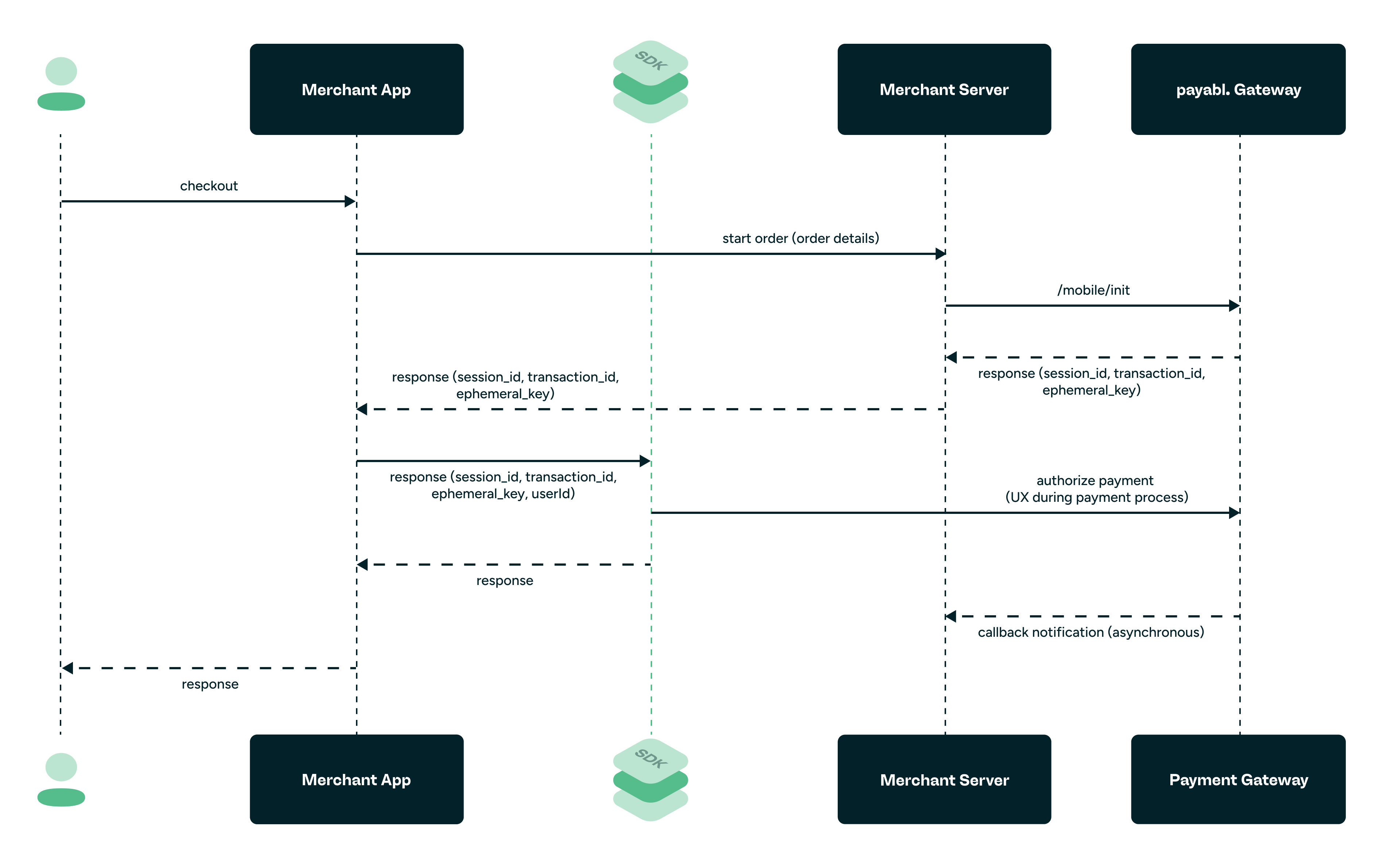
Mobile SDK — Integration Workflow
Integration path
Follow these steps in order for the fastest route to your first sandbox transaction:
1. Try the demo app
See the SDK in action before writing any code. The demo apps run against the payabl. sandbox using a pre-configured demo merchant — no account, server setup, or SDK access required. They cover every payment method and integration pattern, with commented source code you can adapt directly.
| Platform | Pre-built app | Source & setup |
|---|---|---|
| iOS | Join via TestFlight | Demo App: Build & Run (iOS) |
| Android | Download APK | Demo App: Build & Run (Android) |
NoteThe demo app source code lives in a private repository. To clone it and explore the commented reference implementation, complete SDK access first — one request covers both the SDK and demo repositories.
2. Get SDK access
The SDK is distributed through private GitHub repositories. Request access and set up your package manager.
→ SDK Access Guide
3. Set up your server
Your backend creates payment sessions and provisions credentials to your app. This step is required for every payment method on both platforms — the demo app skips it only because it uses a payabl.-hosted demo merchant configuration.
→ Setup Your Server
4. Integrate your platform
Configure your project, then integrate the Hosted Payment Page or the standalone payment methods you need.
5. Test your own integration
Use our sandbox test data — test cards, bank simulator values, and wallet test setup — to exercise success, failure, and cancellation flows.
→ Testing
6. Troubleshoot with the Error Code Reference
Every error returned by the SDK and backend is cataloged with its cause and the action to take.
→ Error Handling & Troubleshooting
7. Mobile SDK FAQs
Please find our FAQ section to frequently answered questions
→ Mobile SDKs FAQs
8. Onboarding wizard
Quickly request access and setup your sandbox account
→ Sandbox onboarding wizard
Requirements
| iOS | Android | |
|---|---|---|
| Minimum OS | iOS 17.6+ | Android 9 (API 28)+ |
| Language | Swift | Kotlin |
| Distribution | Swift Package Manager / CocoaPods | Gradle (Maven) |
Need help?
If you run into an issue the Error Handling & Troubleshooting doesn't resolve, contact [email protected] with your merchant ID and the error code you received.
Updated 9 days ago