
Wero
Wero is a European instant payment solution that allows users to send and receive money quickly and securely between bank accounts, working seamlessly across participating banks and payment providers in the EU.
| Payment type | A2A Transfer, Wallet |
| Payin countries | Germany |
| Customer currencies | EUR |
| Processing currencies | EUR |
| Refunds | Yes |
How to pay with Wero
- The customer is redirected to a Wero-hosted payment page where they can scan the QR to pay through the Wero app
- The customer will confirm the transfer via the Wero app
- After the payment is complete, they are redirected back to the website or shop.
General Flow
POST Request -> to /payment_preauthorize
<- Response (direct, synchronous) with status=2000&errormessage=pending and redirect_url
Customer is redirected to redirect_url (Wero URL)
<- Callback (asynchronous) with errorcode=0&payment_state=not_credited_yet to notification_url
Step 1. Make a transaction request
From your server, make a POST /payment_preauthorize request.
POST https://sandbox.payabl.com/pay/backoffice/payment_preauthorizeInclude in request:
| Parameter | Format | Description |
|---|---|---|
merchantid | 40 characters | Merchant identification number assigned during account creation |
orderid | max. 40 characters | The field orderid is optional and exclusively for the merchants' convenience |
amount | digits only, either no decimals or two decimal places (e.g. 8 or 8.50) | Transaction’s total amount that will be deducted from the customer |
currency | 3 characters. ISO 4217 | The currency field contains the alpha-3 currency code for the transaction. Links to ISO |
payment_method | 213 | Payment methods IDs |
purpose | Max 128 characters | Purpose of the payment, required. |
signature | 40 characters | Signature Calculation |
country | 3 characters. ISO 3166-1 alpha-3 | Customer country. |
email | max. 50 characters | Customer email. An RFC 822 compliant email address |
firstname | max. 50 characters | First name of the customer. |
lastname | max. 50 characters | Last name of the customer |
notification_url | max. 255 characters starting with http or https | URL for notifications. |
url_success | max. 255 characters starting with http or https | Successful transaction redirect URL |
url_failed | max. 255 characters starting with http or https | Failed transaction redirect URL |
url_return | max. 255 characters starting with http or https | URL for customer redirection |
You can see the full list of parameters in Authorization
Request example:
merchantid=gateway_test&orderid=Payabl-Test&amount=19.99¤cy=EUR&payment_method=213=en&customerip=2.22.75.244&[email protected]&language=de&firstname=John&lastname=Doe&zip=3035&street=Olympion&house=23&city=Limassol&country=CYP&url_return=https://yourshop.example/thank_you¬ification_url=https://yourshop.example/notification&url_success=https://yourshop.example/payment_successful&url_failed=https://yourshop.example/payment_failed&signature=cc02144209602d208d3138a27b0b0a2e8b8562deOptional parameters:
| Parameter | Format | Description |
|---|---|---|
shipping_first_name | String(100) | First name of the shipping address. |
shipping_last_name | String(100) | Last name of the shipping address. |
shipping_company | String(100) | Company name of shipping address. |
shipping_address_line_2 | String(100) | Additional (street) information of shipping address. |
shipping_address_line_1 | String(100) | Street of the shipping address. |
shipping_address_number | String(10) | House number of the shipping address. |
shipping_postal_code | String(10) | Postcode of shipping address. |
shipping_city | String(100) | City of shipping address. |
shipping_country_code | String(2) | 2-letter country code (ISO 3166-1). |
shipping_state | String(100) | The state of the shipping address. |
shipping_email | String(255) | Shipping Email address of the buyer. |
shipping_amount | Integer | The shipping costs (if any exist) in smallest unit, eg.Cent |
billing_first_name | String(100) | First name of the billing address. |
billing_last_name | String(100) | Last name of the billing address. |
billing_company | String(100) | Company name of billing address. |
billing_address_line_2 | String(100) | Additional (street) information of billing address. |
billing_address_line_1 | String(100) | Street of the billing address. |
billing_address_number | String(10) | House number of the billing address. |
billing_postal_code | String(10) | Postcode of billing address. |
billing_city | String(100) | City of billing address. |
billing_country_code | String(2) | 2-letter country code (ISO 3166-1). |
billing_state | String(100) | The state of the billing address. |
billing_email | String(255) | Billing Email address of the buyer. |
consumer_wallet_id | String(100) | The wallet ID of the consumer. This value is used to send a notification to the consumer's Wero wallet app. |
merchant_order_reference_number | String(35) | Additional information for the payment reconciliation that is shown in the purpose on bank statements . Characters must comply with the SEPA character set (see SEPA-compliant characters). |
Public Sandbox InformationDo not use your personal email address, Order ID with sensitive information, real customer details and credit card or bank account data in the public Sandbox.
Redirection to
url_returndoes not confirm that the transaction is successful. Always check the transaction vianotification_urlor use the diagnose interface to get the final status of the transaction.
Step 2. Handle the redirect
To complete the payment, you need to redirect the customer to the correct URL in the response.
Response example:
transactionid=216131597&transid=216131597&status=2000&errormessage=pending&errmsg=pending&amount=1.26&price=1.26¤cy=EUR&orderid=Pyabl-test&payment_method=213&Purpose=test&redirect_url=https%3A%2F%2Fpay.werouat.eu%2F96db0b3f-df18-430b-82d9-d1f11a2f36ff&user_id=2083435Response fields reference:
| Parameter | Description |
|---|---|
transactionid | payabl. internal transaction id. Please use this transaction id when referring to the transaction in communications with the payabl. team |
transid | The same as transactionid |
status | Transaction error code |
errormessage | Brief explanation of transaction decline reason (empty on success) |
errmsg | The same as errormessage |
amount | Transaction amount |
price | The same as amount |
orderid | Optional transaction identifier assigned by the merchant |
payment_method | Payment Method ID |
redirect_url | URL for customer redirection to finalize the payment (URL encoded) |
user_id | Payment system user identifier |
After the client completes the payment on Wero, they will be redirected back to your url_return.
Additionally, you will receive a notification to notification_url, which should be used to update statuses in your system.
Step 3. Receive the final status
Once the customer completes the payment, we will send a notification with the transaction's final status to the notification_url specified by you.
url_return and notification_url should be passed by you in the Pre-authorization request.
Alternatively, you can communicate a notifciation_url to be used by default to payabl. technical team. By doing so, you won't need to send it in every request.
Wero notifications contains an additional notification parameter which is payment_state, which could contain the following values:
not_credited_yet: Capture - Accepted.credited: Capture - Successful.not_credited: Capture - Failed.
Each state change would trigger a notification to the notification URL. The notification URL is the URL that was provided when the merchant account was created.
You will receive a notification from payabl. regarding the status update of the transaction. If payabl. received funds from the issuer for the transaction you will get the appropriate notification.
Notification example - Accepted Capture:
transactionid=104579096&security=32ffe6f775a31a3ef694725bd8e9acd50e1e3345f57f11416b417e7a6505f1e9×tamp=1660132694&errormessage=&errorcode=0&orderid=Payabl-Test&type=capture&amount=19.99&payment_state=not_credited_yetNotification example - Successful Capture
errorcode=0&transactionid=104579096&amount=19.99&type=capture&security=c9ec2d956a532f2c5e5e2c2fb2edc084e4b2df8e45a1fea36fd6500cd47849ac&payment_state=credited×tamp=1660132695&errormessage=&orderid=Payabl-TestNotification fields reference:
| Parameter | Description |
|---|---|
transactionid | payabl. internal transaction id. Please use this transaction id when referring to the transaction in communications with the payabl. team |
type | Transaction type |
errorcode | Transaction error code (0 for success) |
errormessage | Brief explanation of transaction decline reason (empty on success) |
amount | Transaction amount |
orderid | Optional transaction identifier given by the merchant |
security | Signature to verify the authenticity of the notification. You can find more information here |
timestamp | Notification timestamp |
payment_state | Transaction acceptance state as described above |
When the customer finished or canceled the payment, he will be redirected back to url_return, provided by you in the initial request to payment_preauthorize. After that, you will receive a notification, posted to notification_url, with the final transaction status, which you should use to update your system.
Notification URL can be configured by our tech support team in your account on our side,
or you can send it as a parameternotification_urlin the initial request to payment_preauthorize.
In case 15 days pass and payabl. didn't receive any funds from an issuer, the transaction will be failed automatically. You will receive a notification update.
Refunds
General Flow
POST Request -> to / payment_refund
<- Response (direct, synchronous) with status=2000&errormessage=pending and redirect_url
Customer is redirected to redirect_url
<- Callback (asynchronous) with errorcode=0&payment_state=not_refunded_yet to notification_url
Step 1. Make a refund request
From your server, make a POST /payment_refund request.
POST https://sandbox.payabl.com/pay/backoffice/payment_refundInclude in request:
| Parameter | Format | Description |
|---|---|---|
merchantid | 40 characters | Merchant identification number assigned during account creation |
transactionid | Digits only | The original transaction from where to make refund |
amount | digits only, either no decimals or two decimal places (e.g. 8 or 8.50) | Transaction’s total amount that will be refunded to the customer |
currency | 3 characters. ISO 4217 | The currency field contains the alpha-3 currency code for the transaction. Currently it only accepts EUR |
refund_reason | 1 digit only | One of these options: 1: Returned Goods 2: Wrong Amount Correction 3: Pre Dispute Refund 4: Subscription Refund 5: Service Late Cancellation 6: Other |
refund_comment | Max 100 characters | Required – free text comment |
signature | 40 characters | Signature Calculation |
Request example:
merchantid=gateway_test&transactionid=11111111&amount=19.99¤cy=EUR&
refund_reason=1&refund_comment=test&signature=cc02144209602d208d3138a27b0b0a2e8b8562deResponse fields reference:
| Parameter | Description |
|---|---|
transactionid | payabl. internal transaction id. Please use this transaction id when referring to the transaction in communications with the payabl. team |
transid | The same as transactionid |
status | Transaction error code |
errorcode | Transaction error code (0 for success) |
errormessage | Brief explanation of transaction decline reason (empty on success) |
errormsg | The same as errormessage |
amount | Transaction amount |
price | The same as amount |
currency | Transaction currency |
Step 2. Receive the final status
Once the refund is completed, we will send a notification with the transaction's final status to the notification_url specified by you in initial authorization transaction.
Alternatively, you can communicate a notifciation_url to be used by default to payabl. technical team. By doing so, you won't need to send it in every request.
Wero notifications contain an additional notification parameter which is payment_state, which can contain the following values:
- not_refunded_yet: Refund - Requested.
- refunded: Refund - Successful.
- not_refunded: Refund - Failed.
Each state change would trigger a notification to the notification URL, notification URL is the URL that was provided when the merchant account was created.
Notification example - Refund requested:
transactionid=104579096&security=32ffe6f775a31a3ef694725bd8e9acd50e1e3345f57f11416b417e7a6505f1e9×tamp=1660132694&errormessage=&errorcode=0&orderid=Payabl-Test&type=refund&amount=19.99&payment_state=not_refunded_yetNotification example - Successful refund:
errorcode=0&transactionid=104579096&amount=19.99&type=refund&security=c9ec2d956a532f2c5e5e2c2fb2edc084e4b2df8e45a1fea36fd6500cd47849ac&payment_state=refunded×tamp=1660132695&errormessage=&orderid=Payabl-TestNotification example - Failed refund:
errorcode=0&transactionid=104579096&amount=19.99&type=refund&security=c9ec2d956a532f2c5e5e2c2fb2edc084e4b2df8e45a1fea36fd6500cd47849ac&payment_state=not_refunded×tamp=1660132695&errormessage=Insuficient funds&orderid=Payabl-TestNotification fields reference:
| Parameter | Description |
|---|---|
transactionid | payabl. internal transaction id. Please use this transaction id when referring to the transaction in communications with the payabl. team |
type | Transaction type (refund) |
errorcode | Transaction error code (0 for success) |
errormessage | Brief explanation of transaction decline reason (empty on success) |
amount | Transaction amount |
orderid | Optional transaction identifier given by the merchant |
security | Signature to verify the authenticity of the notification. You can find more information here |
timestamp | Notification timestamp |
payment_state | Transaction acceptance state as described above |
Notification URL can be configured by our tech support team in your account on our side,
or you can send it as a parameternotification_urlin the initial request topayment_preauthorize.
Testing Wero
After redirection to our redirect_url from Step 2.
-
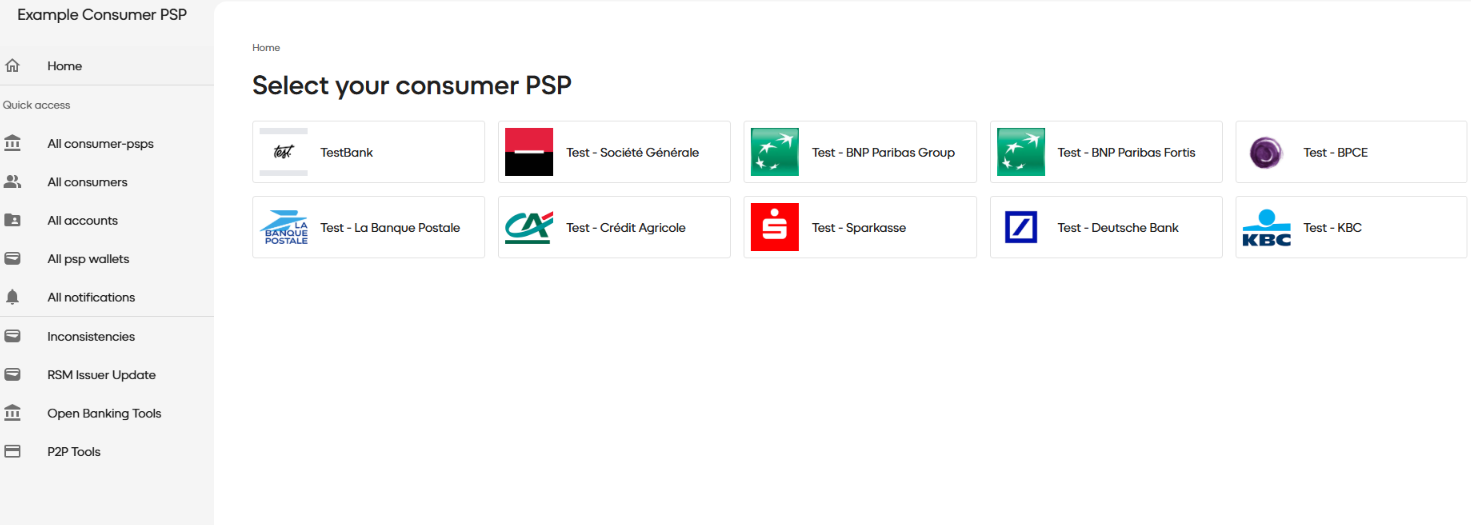
Go to https://example-consumer-psps.werouat.eu/
-
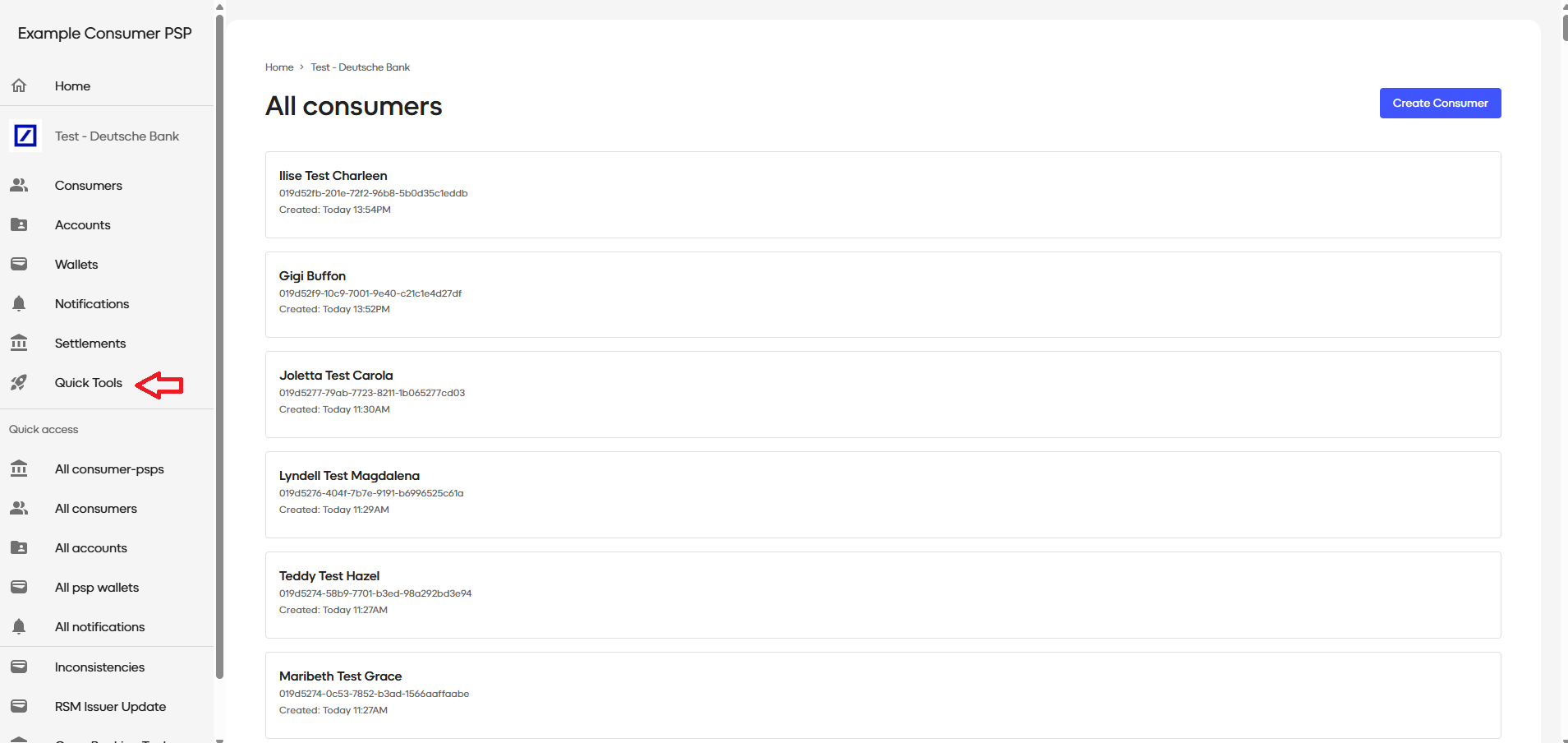
Select any bank and then click Quick Tools from the left panel
-
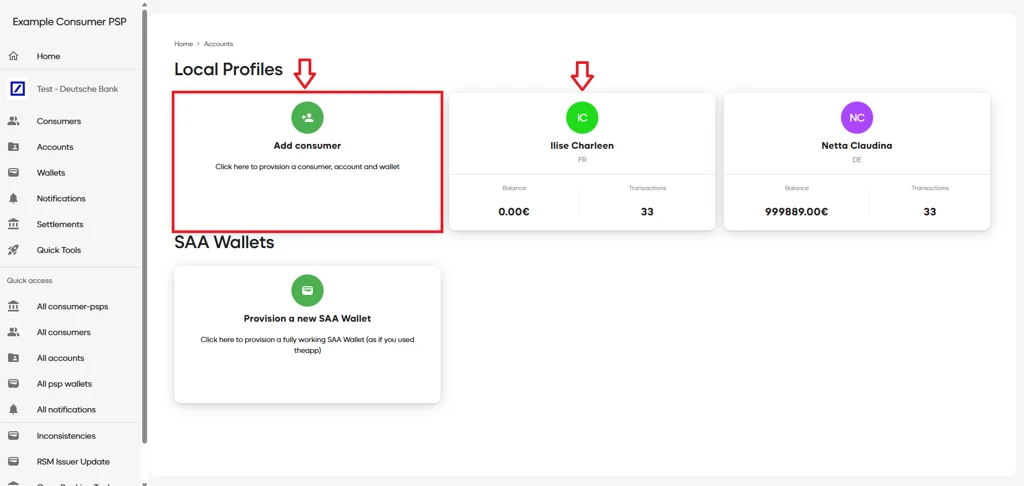
Add a new consumer or select an existing consumer if you already have one.
-
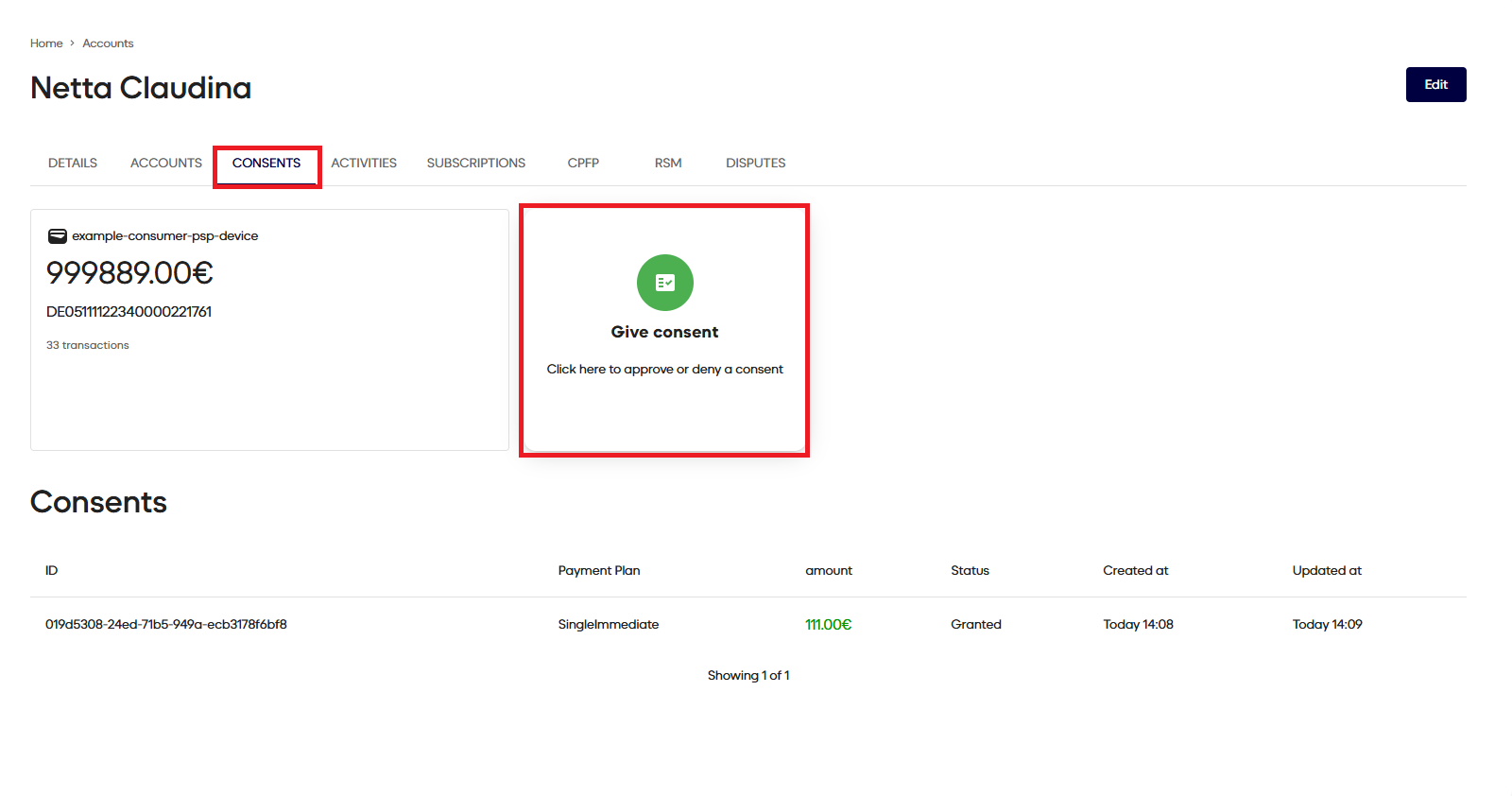
Open the consents tab and click on the Give consent.
-
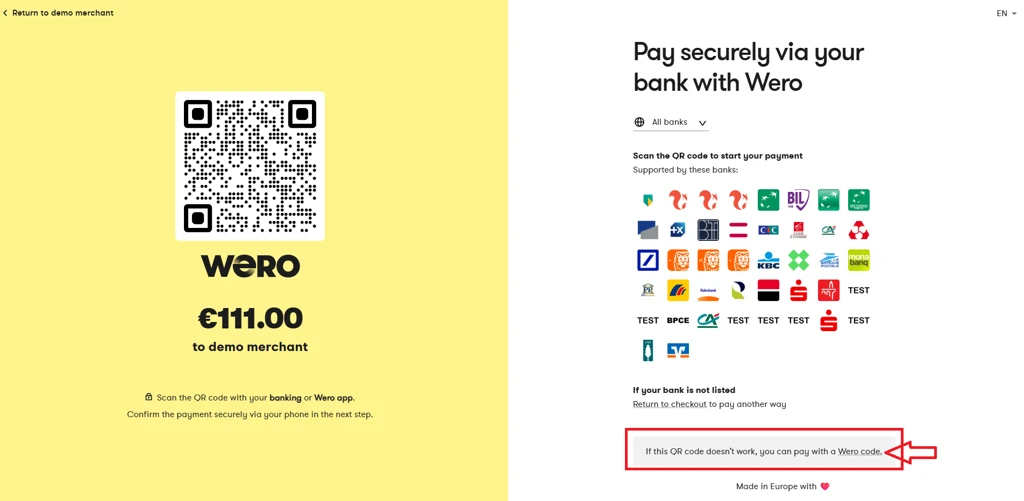
From the Wero payment link click on the “pay with a Wero code.“
-
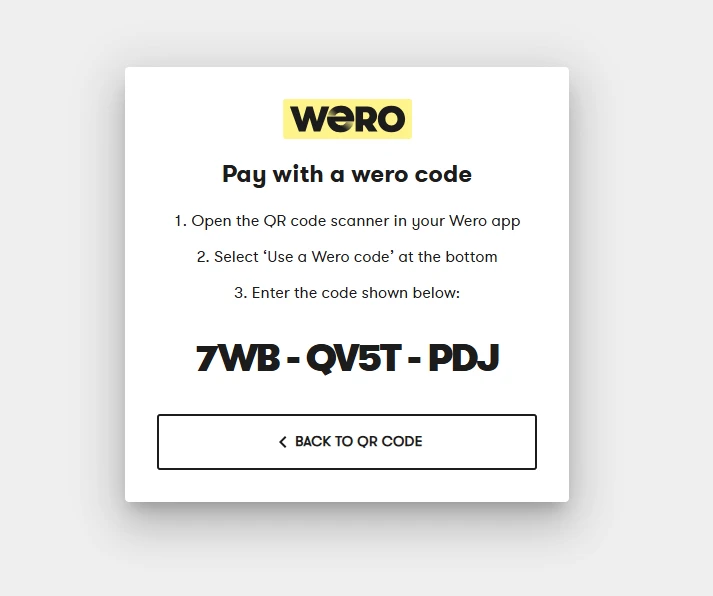
Use the code shown to approve the consent
Updated 4 months ago
What’s Next
Our Technical Support team is there to help you:
Email: [email protected]
Available Monday – Friday between 09:00 and 17:00 CET/CEST