
iOS Project Configuration
System Requirements
- Min supported OS version: iOS 17.6
Install SDK via SPM
-
Install SDK via SPM,
Go to your Project -> Package Dependencies -
Click on
+and findhttps://github.com/payabl-plugins/payablMerchant-iOS -
Select latest major version
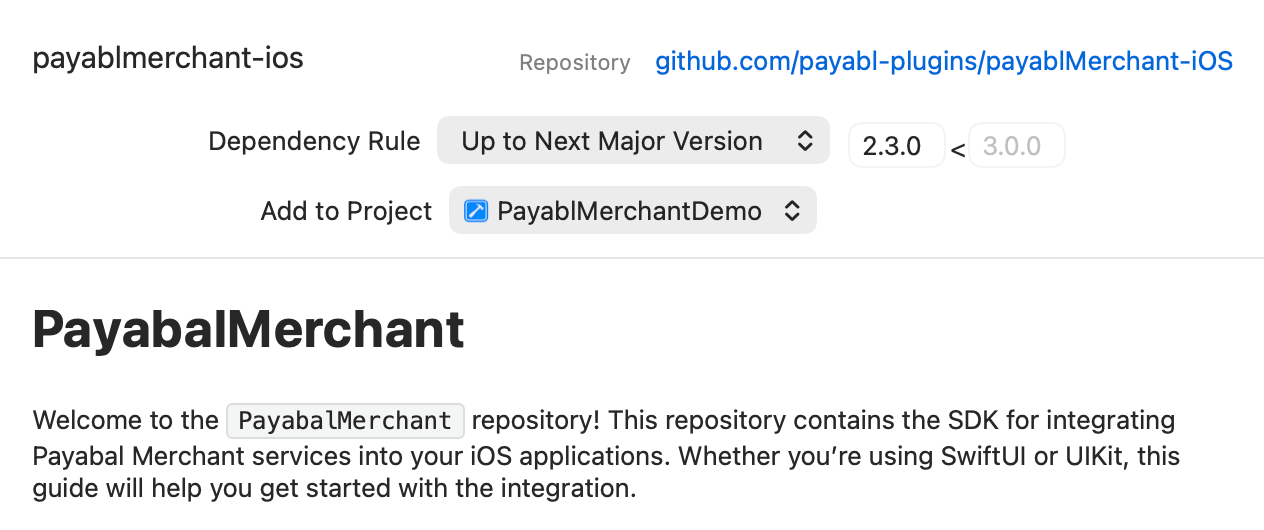
- We distribute 2 SDKs
PayablMerchantLiveandPayablMerchantSandbox, use sandbox for testing purposes but make sure to usePayablMerchantLivebefore releasing to Appstore, notice thatPayablMerchantLiveSDK is not debuggable.
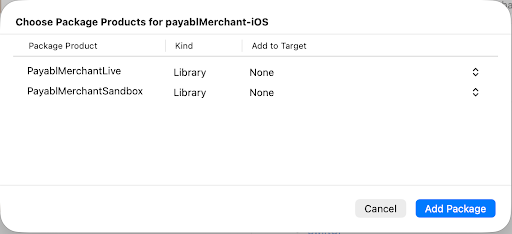
- Make sure only one product is added to your target, importing both products will result in unexpected behaviour
- When switching between products from sandbox to live, we recommend removing the package and adding it again while choosing the correct product if it didnt work normally by adding/removing from
Frameworks, Libraries and Embedded Content
Import the SDK
import PayablMerchantSandboxDeep Linking (Info.plist)
To handle the redirect back from the Banking App (especially for custom schemes like payabl://), you must register the URL scheme.
Add this to your Info.plist:
To handle the redirect back from the Banking App (especially for custom schemes like payabl://), you must register the URL scheme. Add this to your Info.plist:
<key>CFBundleURLTypes</key>
<array>
  <dict>
    <key>CFBundleURLSchemes</key>
    <array>
      <string>payabl</string>
    </array>
    <key>CFBundleURLName</key>
    <string>Payment Callback</string>
  </dict>
</array>
Updated about 2 months ago
Did this page help you?