
Customization
Make the checkout experience uniquely yours. Our Hosted Payment Page (HPP) supports extensive visual customization, allowing you to match the interface seamlessly with your brand's look and feel.
Below is a map representing the customizable components of the page:
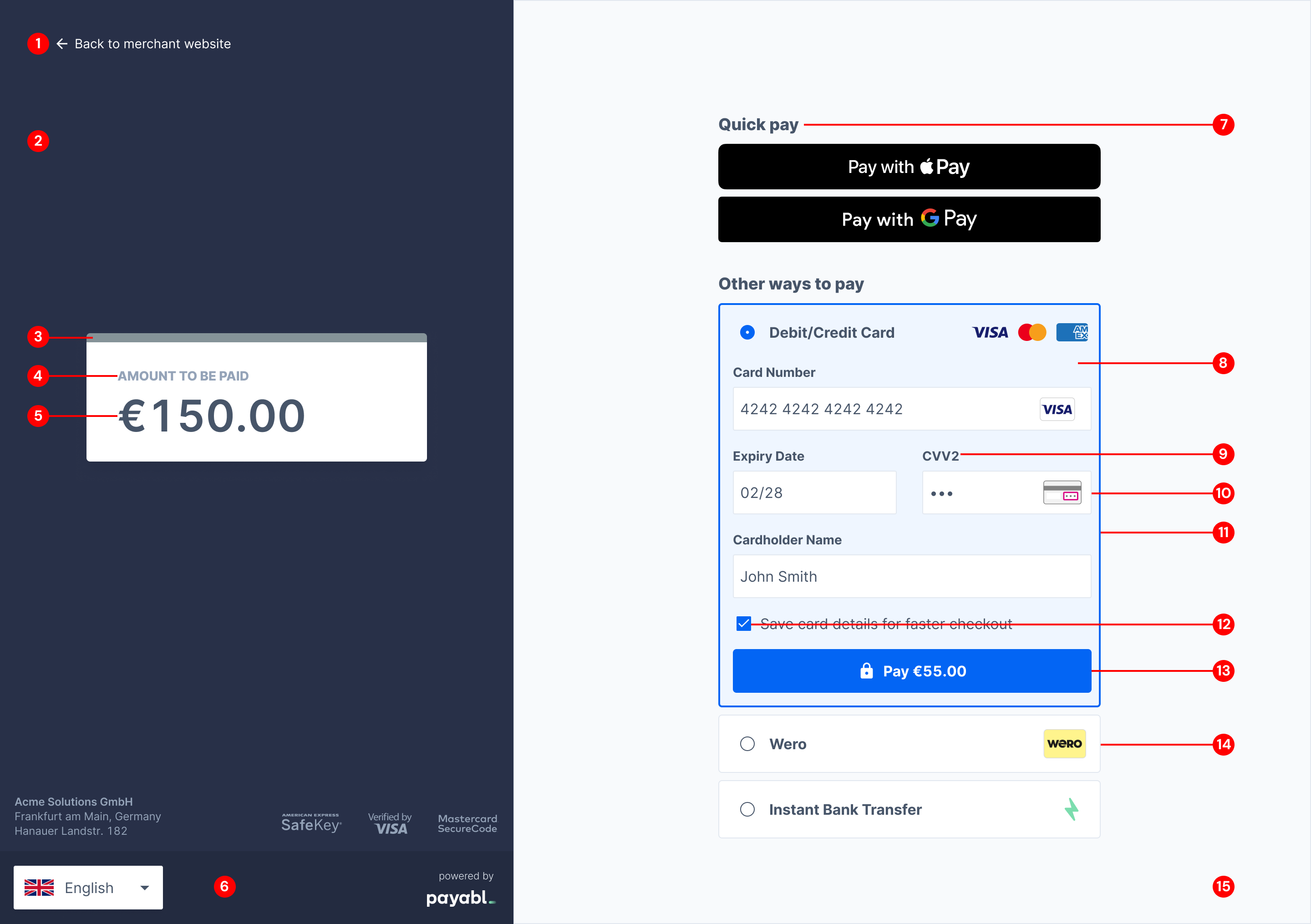
| ID | Component Name | Properties | Description | CSS Examples |
|---|---|---|---|---|
| 1 | Back button | Color | Controls the link typography color for returning to the main shop. |
|
| 2 | Left side container background | Background color | Sets the background fill for the entire left summary column. |
|
| 3 | Amount to be paid topper | Background color | Adjusts the specific accent tab, the top styling above the price panel. |
|
| 4 | Amount to be paid | Box Shadow, Font color | Controls the shadow depth and typography color of the price summary block. |
|
| 5 | Total amount number | Font color | Explicitly targets the text color of the final checkout price digits. |
|
| 6 | Left side container bottom | Background color | Styles the bottom visual padding section of the left card column |
|
| 7 | Payment method label | Font color | Customizes the typography color for payment option text (e.g., "Google Pay"). |
|
| 8 | Payment method container background | Background color | Sets the background fill specifically behind the payment method entry area. |
|
| 9 | Input Label | Font color | Formats field headers like "Card Number", "Expiry date", and "CVV". |
|
| 10 | Input border | Border color, border radius, box shadow | Fine-tunes the corner roundness, outline color, and depth of form inputs. |
|
| 11 | Payment method container border (Active) | Border color | Manages the outer framing line surrounding the active payment method panel. |
|
| 12 | Radio button & Check mark | Background color | Defines the base/accent colors for active form selections. |
|
| 13 | Button primary | Background color, border radius | Sets the fill color and corner roundness for your main execution button. |
|
| 14 | Payment method container border | Border color | Controls row lines separating individual payment type blocks. |
|
| 15 | Body | Background color | Sets the background fill for the entire right side column. |
|
Implementation TipTo enable customization, please contact your Account Manager directly or reach out to our Technical Support team. When doing so, please provide your preferred styling values for each component so we can configure your HPP design.
Email: [email protected]
Support Hours: Monday to Friday, 09:00 - 17:00 CET/CEST
Updated 3 months ago
Did this page help you?